Fill This Room Trend: Make Yours Without Sharing Your Chat History

What the ChatGPT 'fill this room' trend is, what your result can reveal, and how to make a room that looks like you from an empty-room photo and a short list you control.
In this article
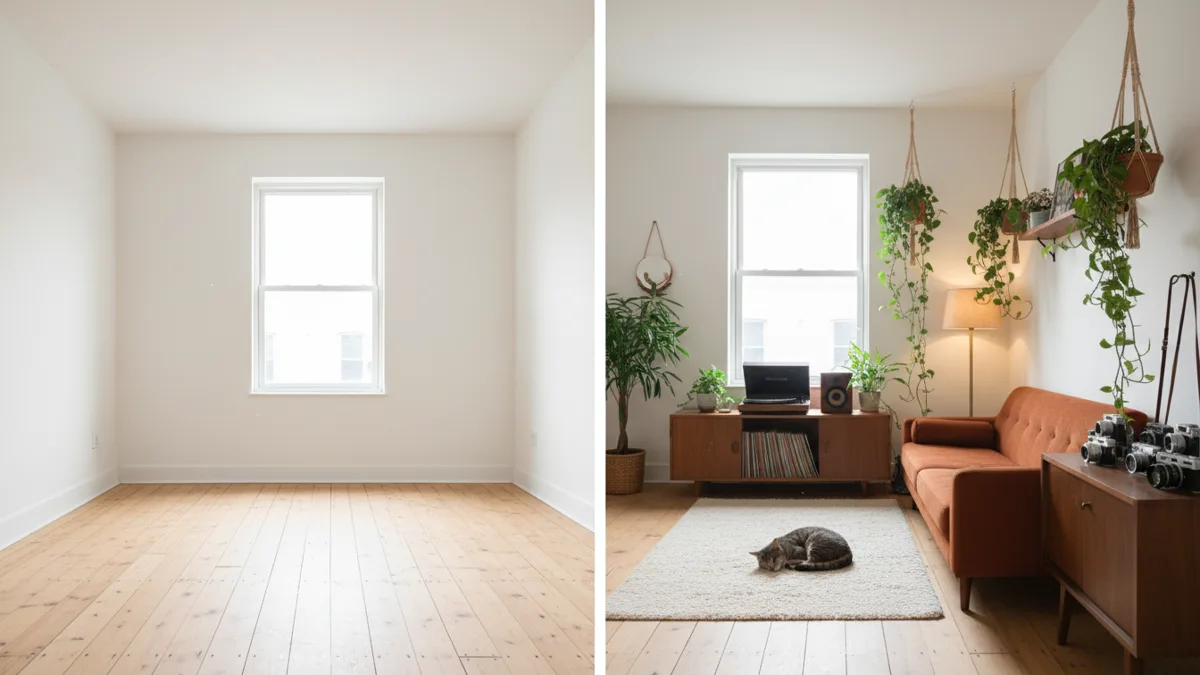
You upload a photo of an empty room, type "with everything you know about me, fill this room", and a few seconds later the room is full of your hobbies, your pets, your half-finished projects — sometimes things you forgot you ever mentioned. That surprise is why the fill this room trend spread so fast. It is also why some people stop and ask what exactly they just showed the internet.
This guide explains how the trend works, what a ChatGPT result can reveal, and how to make your own room from a short list you write yourself, so you decide what goes in the picture. It is based on OpenAI's own Memory documentation and Vogoo's product pages as of 2026-11-16. Vogoo is not affiliated with OpenAI.
Before you start
- Quick answer: Photograph an empty room, write a short list of things you choose, and generate it in image to image. If you stay in ChatGPT, a temporary chat keeps your saved memories and past chats out of the result.
- Account: generating on Vogoo needs a free account, and downloads from signed-in accounts carry no watermark.
- Cost: new accounts get 20 free credits, enough for one image but not a video. Without a paid plan a video costs at least 120 credits; the Generate button shows the exact price before you start.
- If it fails: credits for a failed generation come back automatically, except for prompts blocked by content safety checks and rare jobs that time out after the model has started.
- Your photos: Vogoo stores the photo you upload, your prompt and the result to run the job and keep your history, and you can ask for a copy or deletion (privacy policy).
What is the fill this room trend?
The format is simple: start with a photo of an empty room, ask an AI image model to furnish it based on what it knows about you, and post the before and after. On ChatGPT the usual wording is some version of "tell ChatGPT fill this room with everything you know about me". The results became a way to show your personality as a picture — a reading nook for the bookworm, a cluttered studio for the musician, three cat towers for the cat person.
The magic comes from ChatGPT's Memory. When Memory is on, ChatGPT can draw on information it saved from earlier conversations. If you rarely use ChatGPT or have Memory switched off, you tend to get a generic, catalogue-style room, which is why some people's results look nothing like them.
What your room can reveal
Every object in a ChatGPT room is a guess built from things you typed at some point: your job, your city, your kids' ages, a health worry, a trip you planned. Posted publicly, the image can say more than the caption.
Before you share a result, look at it the way a stranger would:
- Names, places and dates on books, posters, calendars or screens.
- Work details such as company logos, documents on a desk or a specific job setup.
- Health, money or family clues you would not post as text.
- Anything about other people — partners, children, friends — who did not agree to be in it.
OpenAI's help center explains how to review this. Open Settings → Personalization → Memory to see the controls your account has; depending on your setup they include Reference saved memories and Reference chat history. Turning Memory off does not delete past chats, and temporary chats do not create or update memories.
Check the background objects
Zoom in before you post. Small items — a mug with a company name, a framed photo, a prescription bottle on a shelf — are where most of the personal detail hides.
How to make a fill this room picture on Vogoo
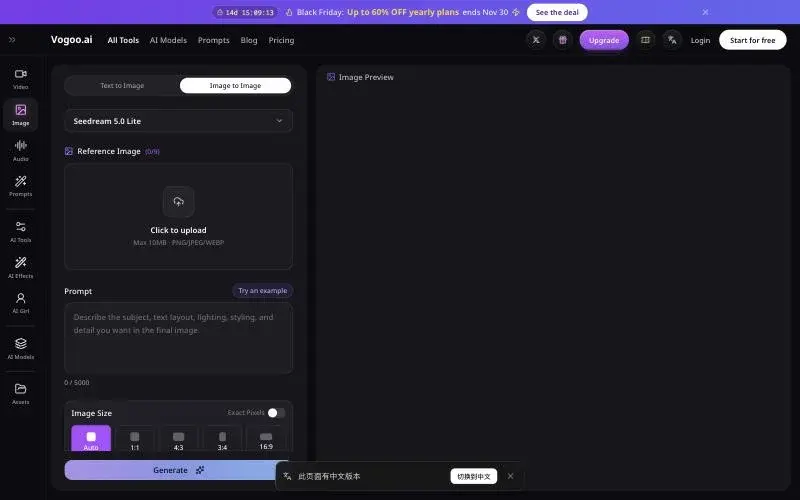
The difference with this route is that nothing comes from your chat history. You write the list, so the room shows exactly what you choose.
Step 1: Photograph an empty room
Any empty or near-empty room works: your own room after moving, a bare corner, or a stock-free photo you took of an empty space. Shoot straight on, in daylight, with the floor and at least two walls visible. Clear lines help the model keep the room's shape.
Step 2: Write your "about me" list
Pick five to eight things you are happy to show. Concrete beats abstract: "a green road bike on a wall rack" works, "I like sport" does not. A good mix covers hobbies, a favourite colour or style, one or two signature objects and maybe a pet.
Step 3: Generate in image to image
Open image to image, upload the empty-room photo and turn your list into one prompt. Keep the instruction about the room's structure at the start so the model furnishes the space instead of replacing it.
Keep this exact room: same walls, windows, floor and camera angle. Furnish it as the home of someone who loves film photography, houseplants and jazz records. Add a mid-century sofa in rust orange, a shelf of vinyl records with a turntable, a vintage camera collection on a wooden cabinet, many trailing plants near the window, a grey cat asleep on a rug and warm evening lamp light. Lived-in and cosy, realistic interior photo, no readable text, no logos, no people.
"No readable text, no logos" keeps the result free of invented names and brands. If one object comes out wrong, run the same prompt again with that item described more precisely rather than rewriting everything.
Step 4: Make the before-and-after
Post the empty photo first and the filled room second, as a two-image carousel or a split screen. If you want motion, take the filled room into image to video and ask for a slow walk-in camera move: "Slow dolly forward into the room, lamp light flickering softly, plants moving slightly, no new objects appear."
Fill Your Room in Image to Image
Your photo • Your list • No chat historyChatGPT vs a list you write
| ChatGPT with Memory | Your own list on Vogoo | |
|---|---|---|
| Where the details come from | Saved memories and past chats, when enabled | Only what you type |
| Surprise factor | High — it may add things you forgot | Low — you choose every object |
| Privacy control | Review in Settings → Personalization → Memory | Vogoo stores your list, photo and result to run the job and keep your history; deletion on request |
| Works for new or light users | Often generic | Yes |
| Room shape kept | Varies by attempt | Ask for it explicitly in the prompt |
Both are valid ways to join the trend. If you like the surprise, use ChatGPT and check the image before you post. If you want a room that says what you mean and nothing more, write the list.
Ideas for your list
- The creator: ring light, camera on a tripod, a moodboard wall, cables everywhere.
- The gamer: a desk with two monitors, LED strips, a shelf of figures, a beanbag.
- The plant parent: hanging planters, a watering can, propagation jars on the windowsill.
- The traveller: a world map, a suitcase with stickers, souvenirs from three places you love.
- The pet household: bowls, a scratching post, toys on the floor, the pet itself on the sofa.
Your room, your rules
The fill this room trend is fun because the room feels personal. You can keep that feeling and still decide what gets shared: write the list yourself, keep text and logos out, and check the background before posting.
Animate Your Room
Turn the finished room into a short walk-in clipFAQ
What is the fill this room ChatGPT prompt?
The common version is "With everything you know about me, fill this room", sent along with a photo of an empty room. ChatGPT then furnishes the room based on what it remembers about you.
Why is my fill this room result so generic?
If Memory is off or you rarely use ChatGPT, it has little to draw on. Writing a short list of your interests into the prompt gives a far more personal room.
Is the fill this room trend safe for privacy?
The image can reflect things you told ChatGPT in the past. Review your Memory settings in Settings → Personalization → Memory, and check the image for names, logos and personal objects before posting.
Can I do the fill this room trend without ChatGPT?
Yes. Upload an empty-room photo to an image-to-image tool such as Vogoo's and describe the objects you want. The details come only from your prompt.
Can I make the fill this room picture without ChatGPT using my chat history?
Yes. Write your own list and generate the room in image to image, or use a temporary chat in ChatGPT, which per OpenAI does not create or update memories. Either way, the picture only shows what you chose to describe.
What does Vogoo keep when I make the picture?
Vogoo's privacy policy says it stores the prompt, the photo you upload and the result to run the job, deliver the download and keep your history. Data is kept only as long as needed, and you can ask for a copy or deletion.
How much does it cost to make this on Vogoo?
New accounts get 20 free credits, enough for one image; the exact price for the model you pick is shown on the Generate button before you start. Downloads from signed-in accounts carry no watermark, and failed generations refund automatically, except content-policy blocks.
Sources
- OpenAI Help Center — Memory in ChatGPT: where to find Memory controls, what turning Memory off does and how temporary chats handle memory.
- OpenAI — Memory and new controls for ChatGPT: OpenAI's announcement of how ChatGPT remembers information across chats.
OpenAI's menu names vary by plan, region and memory experience; the path above is from the help center on 2026-11-16. Vogoo tool details are from its own product pages on the same date.