
Then I Walk In AI: Make the Meme From Your Own Photo
What the Then I Walk In meme is, the shot AI versions copy, and a step-by-step way to make your own walk-in video from one photo, with copy-paste prompts.
Someone posts "the party was dead." The reply is a clip of a person walking toward their own phone camera, face completely serious, with four words on top: then I walk in. Nothing else happens, and that is the joke. If you have tried to make a then I walk in AI version of it, you have probably met the three usual failures: the model makes you smile, it turns the selfie into a shot filmed by someone else, or it writes the caption as "then i wlak in".
This guide covers what the meme is and where it came from, the shot that AI versions copy, and a step-by-step way to make your own with Vogoo's image to video generator, starting from one photo of yourself. The origin facts come from the Know Your Meme entry linked in Sources. The prompts and fixes are our own, written against the video models and settings available in Vogoo as of November 2026. One thing to know up front: Vogoo has no one-tap template for this meme, so you build it with a photo and a prompt. That takes a few more minutes, and it also means you control the place, the outfit and the ending.
What is the Then I Walk In meme?
Then I Walk In is a TikTok catchphrase meme from autumn 2026. According to Know Your Meme, it started with a TikTok user who goes by Alexander the Great (@alexanderthegreat025). He posted the same selfie in the comment sections of many unrelated videos, with confident captions such as "Then I walk in." Know Your Meme traces the image spreading on TikTok from late September 2026.
Through October, other people turned the line into a format. They posted their own selfie, or his, under a setup with the same caption. Know Your Meme records two moments that pushed it wide: an edit by @290dan on October 22 that passed 2 million views in five days, and a video by @georgegaraway on October 24, dressed as Alexander, that passed 3 million views in three days. Alexander also posted his own video playing along with the joke.
You will see it written as "then I walk in", "and then I walk in" and "then I walked in", and the person called "the then I walk in guy". They all point to the same meme.
The shot AI versions copy
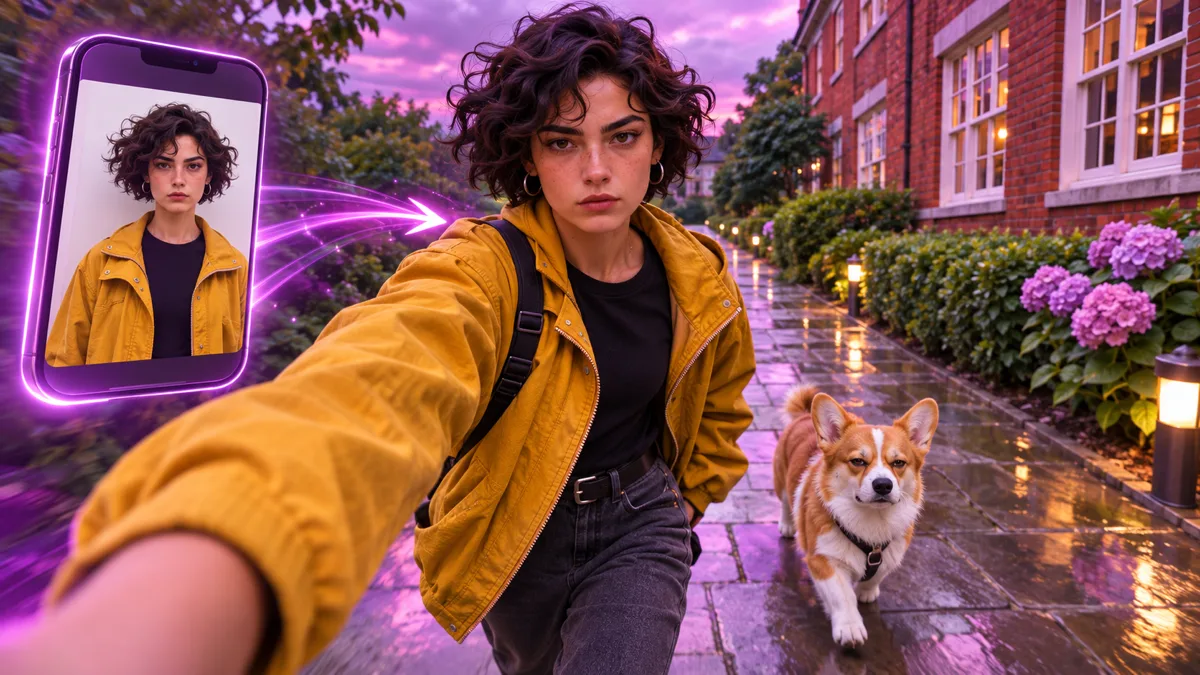
The meme began as a still photo in a comment. What AI tools reproduce is the video version that followed. Based on publicly posted clips and on how current templates rebuild them, the standard picture looks like this:
- Camera: the front phone camera, held at arm's length while walking. It sways a little with each step.
- Framing: head to chest, vertical 9:16.
- Place: an ordinary outdoor path. The best-known clip passes a red-brick building on a grey day.
- Face: calm, serious, lips closed, eyes on the lens the whole time.
- Length: short. Templates use about 8 seconds.
- Text: "then i walk in" in plain white letters at the top.
We could not find an authoritative source that names one official sound for the meme, and the Know Your Meme entry does not list one. Treat any site that promises "the original audio" with care. Vogoo does not supply TikTok sounds or commercial music. Pick the sound inside TikTok or Instagram when you post.
Why the walk-in works (and why AI gets it wrong)
The humor is the gap between the build-up and the entrance. The setup promises a big moment, and the answer is a person calmly walking, as if that settles everything. Any smile, wink or wave turns it into an ordinary selfie video.
Video models tend to break it in predictable ways:
- They add emotion. Models have seen far more smiling selfies than blank ones.
- They change the camera. "A person walking" becomes a tracking shot filmed by someone else, and the selfie feeling is gone.
- They invent a phone. The model draws a phone in the person's hand, which a real front-camera clip never shows.
- They misspell the caption. Text drawn by a video model drifts from frame to frame.
Each has a prompt fix: lock the expression, state that the camera is the phone itself, keep the holding arm at the edge of the frame, and add the caption after generating instead of asking the model to draw it.
Three ways to make it
| Photo + prompt (image to video) | Your own walk as reference (motion control) | Film it yourself | |
|---|---|---|---|
| What you need | One clear photo | A character image and a 3 to 30 second clip of a walk you filmed | A phone and a quiet path |
| Best for | Most people, pets, outfits you don't own | Putting a mascot, a costume character or your pet on a real walk | People who can hold a straight face |
| Control over the walk | Described in the prompt | Copied from your reference clip | Total |
| Main risk | Face drift, added smiles | The reference clip has to be yours to use | Laughing on every take |
| Where | Image to video | Motion Control AI | Your camera app |
Our recommendation: start with photo + prompt. It needs one input and it is the easiest version to fix when something goes wrong. Use motion control when you have already filmed a walk you like and want a different character to perform it. Other creators' clips are not yours to use as a reference; film your own.
How to make a Then I Walk In video on Vogoo
- Pick the photo. Use a sharp, front-facing photo of yourself from the chest up, in daylight, with a neutral face, wearing what you want to walk in. Skip sunglasses and heavy filters. JPG, PNG and WebP are accepted.
- Optional: build the first frame. If your photo is a mirror selfie or was taken indoors, open image to image, upload it, and use the first-frame prompt below to place yourself on an outdoor path in an arm's-length selfie pose. Starting the video from a frame that already looks like a walking selfie is the single biggest quality gain.
- Open image to video and upload the photo or the first frame.
- Pick a model and settings. Based on the generator configuration, Seedance 2.5 supports video durations from 4 to 15 seconds at up to 1080p (motion results may vary). Set the length to 8 seconds and the ratio to 9:16 where the model offers one. Some models follow the shape of the uploaded image, so a vertical first frame keeps the clip vertical. The credit cost is shown on the generate button.
- Decide on sound. Many models can render ambient sound such as footsteps with the picture. If you plan to add a sound in TikTok anyway, switch audio off.
- Paste a video prompt from the next section and generate. If the face smiles or the camera pulls away, keep the same image and regenerate with the matching fix from the troubleshooting table.
- Add the caption when you post. Type "then i walk in" with the text tool in TikTok, Instagram or CapCut. It stays sharp and spelled right, which generated text does not.
Before you spend credits on a full run, check the first frame alone: is the face clearly yours, is the frame vertical, is the expression neutral? Fixing a still is much cheaper than fixing a video.
Then I Walk In AI prompts you can copy
Change the bracketed parts and keep the rest. The prompts describe the action in time order because video models follow a sequence better than a summary.
First frame from your photo (image to image)
Keep the person's face, hair, skin tone and clothing exactly as in the uploaded photo. Reframe as a front-camera phone selfie taken at arm's length while walking outdoors: head-to-chest framing, one shoulder leaning toward the lens, slight wide-angle look. Background: [a wet paved path beside a red-brick building with white-framed windows and green bushes, grey overcast daylight]. Calm, serious expression, lips closed, eyes on the lens. Vertical 9:16, natural phone-photo look, no text, no logos, no other people.1. Classic selfie walk
Keep the person's face, hair and clothing exactly as in the image. One continuous handheld selfie shot, vertical 9:16, 8 seconds. The camera is the person's own front phone camera held at arm's length; the phone itself is never visible. 0-3s: the person walks forward at a slow, even pace, the frame swaying gently with each step, the background sliding past. 3-6s: they keep walking, tilt the head slightly and lower the chin. 6-8s: still walking, a long calm stare straight into the lens. Serious, deadpan expression the whole time, lips closed. No smiling, no talking, no waving, no camera cuts, no text, no extra people.2. Doorway entrance
Keep the person's face, hair and clothing exactly as in the image. Static camera at chest height inside [a warmly lit living room during a small party]. 0-3s: the door at the back of the room opens. 3-6s: the person walks in slowly and stops close to the camera. 6-8s: they look straight into the lens with a flat, serious face and one eyebrow slightly raised. Guests in the soft-focus background turn their heads. No smiling, no talking, no camera cuts, no text. Vertical 9:16, 8 seconds.3. Then we walk in (two or three friends)
For a group, use reference to video, which combines several reference images with one prompt, and add one clear photo per person.
Each person matches their own reference image exactly: face, hair and clothing. One continuous handheld selfie shot, vertical 9:16, 8 seconds. The person in the first reference holds the front camera at arm's length; the others walk shoulder to shoulder just behind. Everyone walks forward slowly along [a city pavement at dusk] and stares into the lens with the same serious expression. No smiling, no talking, no one looks away, no camera cuts, no text, no extra people.4. Pet walk-in
Keep the animal exactly as in the image: breed, fur color and markings. Low camera at pavement height, vertical 9:16, 8 seconds. The [dog] walks straight toward the camera along [a quiet sidewalk] at a slow, confident pace, head level. In the last two seconds it stops close to the lens and stares into it, completely unimpressed. No tongue out, no jumping, no humans, no text, no camera cuts.5. Office edition
Keep the person's face, hair and clothing exactly as in the image. One continuous handheld selfie shot, vertical 9:16, 8 seconds, front phone camera at arm's length, phone never visible. The person walks slowly down [an open-plan office aisle past rows of desks], coworkers out of focus behind them. Calm, serious face, eyes on the lens, a small nod at the end. No smiling, no talking, no camera cuts, no text, no readable screens or logos.Fixing the usual problems
| Problem | What to change |
|---|---|
| The person smiles or laughs | Add "serious, deadpan expression the whole time, lips closed, no smiling", and start from a photo with a neutral face. |
| The camera films them from a distance | Say "the camera is the person's own front phone camera held at arm's length" and "head-to-chest framing". |
| A phone appears in their hand | Add "the phone itself is never visible; the holding arm stays at the edge of the frame". |
| The face drifts away from yours | Use a sharper, closer, front-lit photo, shorten the clip to 5 or 6 seconds, or build the first frame before animating. |
| The walk looks like sliding | Ask for "a slow, even pace, the frame swaying gently with each step". |
| The clip comes out horizontal | Start from a vertical image, and pick 9:16 where the model offers a ratio. |
| Garbled words in the frame | Keep "no text" in the prompt and add the caption in your posting app. |
What most Then I Walk In AI pages skip
- The original face belongs to a real person. The meme grew out of people mocking one man's selfie. Putting his face, or any stranger's, into a generated video is a likeness and consent problem, and it is not needed: the format works with anyone's photo. Use your own, or a friend's with their agreement.
- The caption should not be generated. Text added in the editor is sharp and editable. Text drawn by a video model is neither.
- Realistic AI clips need a label. TikTok requires creators to label AI-generated content showing realistic-looking scenes or people, and unlabeled realistic clips may be restricted or labeled by the platform. A walk-in video made from your photo is realistic-looking content, so turn on the platform label when posting.
- The setup line carries half the joke. The clip is only the punchline. Write the setup in your post text or on a first slide: "Group chat said nobody good is coming tonight", "My dog when I pick up the leash".
More trends to try
If you like formats where the joke is how someone enters the frame, Vogoo's Hotel Lobby AI page builds the hotel lobby trend from two photos, and our Stateside dance AI guide shows the reference-video method step by step. For another deadpan format made with image to video, see the Cofi trend guide.
Ready to make yours? Pick the photo, open image to video, and paste the classic selfie walk prompt.
FAQ
What does "then I walk in" mean?
It is a deadpan punchline. Someone describes a scene, and the answer is a selfie or a short clip of a person arriving with a serious face under the caption "then I walk in", as if their entrance changes everything.
Who started the Then I Walk In meme?
According to Know Your Meme, it began with a TikTok user who goes by Alexander the Great (@alexanderthegreat025), who posted the same selfie with that caption in many comment sections. It spread from late September 2026 and became a wider format in October.
How do I make a Then I Walk In AI video?
Upload one clear photo of yourself to an image to video generator, describe an arm's-length selfie walk with a serious stare, set about 8 seconds and 9:16, generate, then add the caption in your posting app.
Is there a one-tap Then I Walk In template on Vogoo?
No. On Vogoo you make it with image to video and a prompt. The prompts in this guide are written for that, and you can change the place, the outfit and the ending.
Does the video come with the TikTok sound?
No. Vogoo does not supply TikTok sounds or commercial music. Some models can generate ambient sound such as footsteps. Add the sound you want inside the app when you post.
Can I use someone else's photo?
Only with their agreement. Do not use the original creator's selfie, a celebrity or a stranger. Putting a real person's face into a generated video without consent can break platform rules.
Do I have to label it as AI-generated?
On TikTok, yes for realistic clips: it asks creators to label AI-generated content that shows realistic scenes or people. Check each platform's current rules before posting.
Sources
- Know Your Meme — Then I Walk In: origin, the creator's handle, and the dates and view counts cited above. The entry was still marked as a submission under review when we checked.
- TikTok Support — About AI-generated content: official support documentation on AI-generated content labeling.
- TikTok — Community Guidelines: Integrity and Authenticity: the requirement to label AI-generated content showing realistic scenes or people.
Checked on 2026-11-11. The description of the standard shot is based on publicly posted clips and on how current AI templates reproduce them; we did not find an authoritative source for an official sound. Prompts, the method comparison and the troubleshooting table are Vogoo's own, derived from code and interface configuration review of the models and settings in Vogoo on that date (no first-party generation testing was performed). View counts and platform rules change, so use the sources above for current figures and policy.
Author

Categories
More Posts
Happy Horse vs Seedance: Which Model to Pick?
Happy Horse vs Seedance: who makes HappyHorse 1.0, how it compares with Seedance 2.0 and 2.5 on modes and audio, and what a 5s clip really costs on one account.
Audio to Video AI: Seedance 2.5's Audio-Only Mode
Seedance 2.5 adds audio-only reference: drive pacing, beat cuts, and lip sync from one music or voice clip. Audio to video AI guide with official demos.
Seedance 2.5 Prompt Guide: The @ Reference Syntax
This Seedance 2.5 prompt guide covers the official @ reference syntax: 7 modality combos, 50-reference specs, ratio rules, and real ByteDance prompts.
Newsletter
Join the community
Subscribe to our newsletter for the latest news and updates