
Raindance AI Trend: How to Make the Pier Video
Explore the Raindance AI trend and create your own pier video from two photos, featuring clear motion prompts and practical fixes for identity mixing.
You saw it on your feed: two people on a wooden pier at sunset, one sitting at the edge, the other singing to them while the light turns gold. Then you saw it again with a couple, then with two rivals who would never sing to each other, then with someone's cat. That is the Raindance AI trend, and most people who try to make one hit the same three problems. The template gives them a generic clip that looks nothing like their photos. The two faces blend into one person. Or they expect the AI to produce the song, and it doesn't.
This guide covers what the Raindance AI trend is, what part of it AI actually makes, and three ways to build your own version on Vogoo, from a one-click effect to a fully prompted scene. It includes copy-paste prompts and a troubleshooting table.
How this guide was put together: every step and setting below was checked against the current options in Vogoo's Hotel Lobby AI, Reference to Video, image to image and image to video tools on 2026-11-11. Facts about the song come from the label's own press releases, listed in the sources. Where we could not verify something about the trend, we say so instead of guessing.
What is the Raindance AI trend?
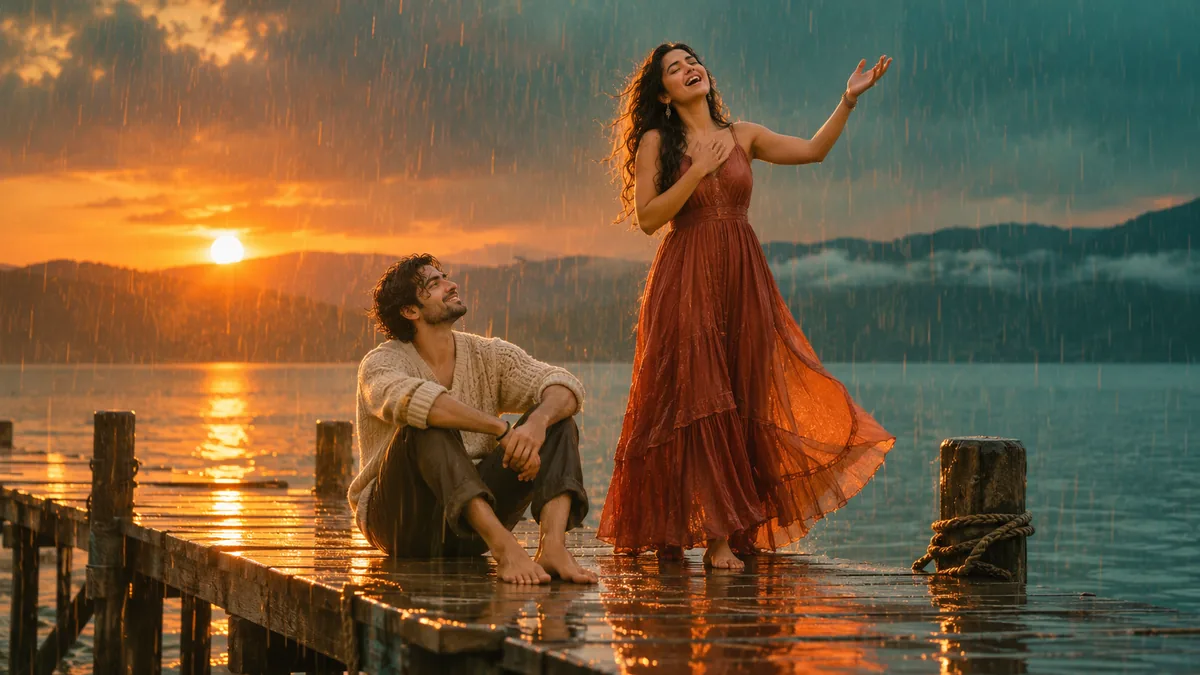
The Raindance AI trend is a photo-to-video format. You supply photos of two people (or characters, or pets), and an AI video model places them in a short romantic music-video scene: a wooden pier over the water, warm low sun, one person seated at the end of the pier and the other singing to them.
The name comes from "Raindance", a song by British rapper Dave featuring Nigerian singer Tems, from Dave's album The Boy Who Played the Harp. The official video was filmed in Lagos, Nigeria and released on 9 January 2026, according to the label's announcement, and the single reached No. 1 on the UK singles chart later that month.
Three things are worth getting straight before you make one:
- The song is not AI. "Raindance" is a human-made, copyrighted recording. The AI part of the trend is the recreated video only.
- It is a format, not a dance. Despite the name, nobody is doing choreography. The appeal is the casting: who is sitting, who is singing, and how unlikely the pairing is.
- Current popularity has not been measured. We have no live popularity evidence. The creative scene can be used for couples, anniversary posts, or parodies as a suggested use case, though results are not guaranteed.
One thing we could not confirm is who posted the first Raindance AI video. Tool sites give different accounts and none of them cite a source, so we are not going to name one.
What AI can and cannot recreate
Most disappointment with this trend comes from expecting the wrong thing from the tool. Here is the honest split.
| Part of the trend | Can AI make it? | What to do |
|---|---|---|
| Your two people in the scene | Yes | Upload clear photos as identity references |
| The pier, sunset and rain look | Yes | A preset effect or a scene prompt |
| Gentle singing and swaying | Yes, loosely | Describe the action beat by beat |
| The exact cuts and timing of the official video | No, not from a prompt | Accept "inspired by", or film your own reference clip |
| The actual song | No | Add the official sound in the app you post to |
That last row matters most. No AI video tool on Vogoo ships the Dave and Tems recording, and you should be suspicious of any site that says its output includes it. TikTok and Instagram Reels both license the track, so the clean way to get it is to pick the sound inside the app when you post.
Three ways to make a Raindance AI video
Most guides show one method, usually the site's own template. The right method depends on how much control you need, so here are all three side by side.
| 1. Raindance effect | 2. Reference to Video | 3. Still first, then animate | |
|---|---|---|---|
| Where | Hotel Lobby AI, Effects tab | Reference to Video | Image to image, then image to video |
| You provide | 1–2 photos | 2 photos + a prompt | 2 photos + two prompts |
| Prompt control | None, the scene is preset | Full | Full, and you approve the frame first |
| Best for | A fast couples edit | Custom outfits, poses and mood | Parodies, pets, clay or cartoon styles |
| Main risk | You get our scene, not yours | Faces can swap sides | Two generations instead of one |
If you only have five minutes, use method 1. If you care who sits and who sings, use method 2. If the first frame has to be exactly right, use method 3.
Before you start: pick the right photos
Bad input photos cause most failed results, in any tool.
- One face per photo, front-facing or slightly turned, in even light.
- No sunglasses, hands, hair or heavy filters over the face.
- Similar quality for both photos. If one is a sharp portrait and the other a blurry crop, the model favors the sharp one and the other person drifts.
- Use photos of people who agreed to be in the video. More on that below.
Method 1: the one-click Raindance effect
This is the fastest route, and the scene is already written for you.
- Open Hotel Lobby AI. The page opens on Rap Video, so switch to the Effects tab.
- Under Add your photo, choose Two Photos and upload one photo per person, or choose One Photo of Both if you already have a picture together. A single photo also works if you want a solo version.
- Under Pick an effect, scroll to Raindance (the 🌧️ tile).
- Open Pick Quality & Length. The default is the Standard tier at 720p, 5 seconds, 9:16. You can change the model tier, go up to 15 seconds (30 on the Ultra tier), or switch the format to 1:1 or 16:9. Each option shows its credit cost before you commit.
- Click Make the Effect. You need to be signed in, and the button shows the total credits first.
- Download the result and add the sound when you post.
What you get: your people singing and moving gently on a wooden pier at golden hour while warm rain starts to fall. What you do not get: a prompt box. The Effects tab has no text field, so you cannot decide who sits, change outfits or move the scene. Any sound in the clip is AI-generated and is not the original song. If you need more control, move to method 2.
Method 2: write the scene yourself in Reference to Video
Reference to Video lets you attach identity photos and describe the whole shot. This is where you control the casting.
- Open Reference to Video.
- Upload your two photos as reference images. The order matters, because the prompt refers to them as image 1 and image 2.
- Pick a model. The Seedance models are the practical choice here: they accept 9:16, run 4 to 15 seconds, and Seedance 2.0 Mini is the low-cost option for test runs.
- Set the aspect ratio to 9:16 and the length to 8–10 seconds. Shorter clips hold faces better.
- Paste the base prompt from the next section and edit the outfits.
- Leave Generate Audio off. You are going to add the real sound in TikTok or Reels anyway, and a silent clip avoids two soundtracks fighting each other.
- Generate at a low resolution first, check the faces, then rerun the keeper at a higher one.
Reference to Video also accepts short reference videos. If you want a specific blocking, film ten seconds of two friends in position, one seated and one standing, and attach that. Use footage you shot yourself. Do not upload the official music video as a reference.
Method 3: build the still first, then animate it
For parodies and stylized versions, the first frame is everything. This method lets you approve it before spending credits on video.
- Open image to image and upload both photos. The tool accepts multiple input images, so the model can combine two people into one scene.
- Use the still prompt below to place them on the pier. Regenerate until both faces and the seating are right.
- Open image to video, upload that still as the reference image, and paste the motion prompt.
- Keep the clip to 5–8 seconds. The still already fixes the composition, so the video only has to add movement.
If you have no photos at all, for example for two original clay characters, start in text to image instead and describe both characters in the still prompt.
Raindance AI prompts you can copy
Replace the bracketed parts. Keep the structure: identity first, then setting, then action, then camera, then what to avoid.
Base scene for Reference to Video (two photos)
Reference image 1 is the person sitting. Reference image 2 is the person singing. Keep both identities distinct and do not blend their faces.

A weathered wooden pier over calm water at golden hour, low orange sun behind them, light warm rain beginning to fall, wet planks reflecting the sky.

The person from image 1 sits at the end of the pier in [outfit 1], relaxed, looking up with a small smile. The person from image 2 stands beside them in [outfit 2] and sings to them, one hand on their chest, swaying gently. Halfway through, the seated person laughs and looks away, then back.

Slow push-in from a medium two-shot to a closer two-shot, steady camera, shallow depth of field, soft backlight, music-video look. Vertical 9:16.

No extra people, no text, no logos, no microphone, no sudden cuts.
Still for image to image (two photos into one frame)
Combine the two people from the input images into one photorealistic scene. Keep each face, hairstyle and skin tone exactly as in their photo.

The first person sits at the end of a weathered wooden pier, legs relaxed, looking up. The second person stands next to them, mouth open mid-song, one hand raised. Golden hour, low sun over the water, light rain, wet reflective planks, soft backlight.

Vertical 9:16, medium two-shot with both full upper bodies visible, no text, no watermark, no extra people.
Motion prompt for image to video (after the still)
Keep both people exactly as in the reference image. The standing person sings and sways gently, the seated person watches, smiles and shakes their head slowly. Warm rain keeps falling, ripples on the water, light wind in hair and fabric. Slow push-in, steady camera, no cuts, no new people, no text.Unlikely-duo parody (original characters, not real people)
Two original characters who are obvious rivals: [character 1, e.g. a tired office manager in a grey suit] sits at the end of a wooden pier with arms crossed, unimpressed. [Character 2, e.g. an over-keen intern in a bright yellow raincoat] stands beside them singing with total sincerity. Golden hour, light rain, wet planks, cinematic music-video look, deadpan comedy. The seated character slowly, reluctantly starts to nod along. Vertical 9:16, steady camera, no text, no logos.Pet version
Keep each pet's face, fur color and markings exactly as in its reference image. [Pet 1] sits at the end of a wooden pier looking out at the water. [Pet 2] stands beside it on its hind legs, head tilted back as if singing. Golden hour, light rain, wet planks, soft backlight, gentle comedy, natural fur detail. Vertical 9:16, steady camera, no people, no text.Clay (claymation) version
Stop-motion claymation style, visible fingerprints in the clay, slightly jerky movement. Two clay characters on a miniature wooden pier set, painted sunset backdrop, tiny clear beads for rain. One sits at the end of the pier, the other stands and sings with a wide clay mouth. Warm practical lighting, shallow depth of field, handmade look. Vertical 9:16, no text.For more on beat-by-beat prompt structure, see our Seedance 2.5 prompt guide.
Fixing the usual problems
| Problem | Why it happens | Fix |
|---|---|---|
| The two faces blend into one | Photos are too similar in angle, or the prompt never separates them | Name image 1 and image 2 explicitly and add "keep both identities distinct" |
| The wrong person is sitting | The model picks roles by itself | State the role per image, and upload the seated person first |
| Faces drift near the end | The clip is too long | Cut to 5–8 seconds and rerun |
| The rain looks like a storm | "Rain" with no qualifier | Write "light warm rain beginning to fall" |
| A microphone or band appears | "Singing" suggests a stage | Add "no microphone, no extra people" |
| The mouth does not match the lyrics | The model animates singing without hearing your audio | Expected. Cut to the seated person on the busiest lines, or keep the singer in a wider shot |
| The clip looks nothing like the official video | Prompts describe a scene, not a specific edit | Treat it as "inspired by", or film your own blocking as a reference clip |
One method to skip for this trend is motion control. It maps one performer from a reference clip onto one character, which is right for solo dance formats like the Stateside dance but not for a two-person scene.
Adding the song without getting muted
- Export the clip silent, or mute it in your editor.
- Upload it to TikTok or Reels, tap the option to add a sound, and search for "Raindance".
- Pick the official sound and line the hook up with the moment the singer leans in.
Using the in-app sound keeps the audio licensed on that platform and attaches your post to the sound's page, which is where people browsing the trend find it. Uploading the track yourself, baked into the video file, is the usual reason these edits get muted or taken down.
If you would rather avoid the song entirely, give the scene an original track. An instrumental with a warm, slow feel does the same job for an anniversary post, and it can be used anywhere without a licence question.
Real people, celebrity pairings and AI labels
The funniest versions of this trend pair two famous people who would never share a pier. That is also the version most likely to get a post removed.
- Use photos of people who said yes. Yourself, your partner, your friends. Vogoo's tools ask you to have permission for the photos you upload.
- Skip real celebrities and the artists themselves. Placing a real person's likeness into a romantic scene they never filmed can violate platform policies against misleading synthetic media and impersonation. Original characters styled as recognizable archetypes can be used for a similar comedic effect, though avoiding moderation penalties cannot be guaranteed.
- Label realistic results. TikTok's Community Guidelines require creators to label AI-generated content that shows realistic scenes or people, and YouTube similarly requires disclosure for realistic altered or synthetic content. Stylized clay and cartoon versions carry less risk because viewers can readily tell they are not authentic footage.
Start with the fast version
The Raindance AI trend is a simple recipe: two clear photos, a pier at golden hour, one person sitting and one singing, and the real sound added when you post. Try the preset first, see how your photos hold up, and move to a written prompt only if you need to control the casting.
Make your first one with the Raindance effect in Hotel Lobby AI, or write the full scene yourself in Reference to Video.
FAQ
What is the Raindance AI trend?
It is a photo-to-video format in which AI places two people on a wooden pier at golden hour, one seated and one singing to them. It is named after the song "Raindance" by Dave featuring Tems, and people post it with that sound.
What song is used in the Raindance AI trend?
"Raindance" by Dave featuring Tems, from the album The Boy Who Played the Harp. It is a human-made, copyrighted recording. AI tools generate the video only, so you add the sound inside TikTok or Reels when you post.
How do I make a Raindance AI video?
Upload one clear photo per person, choose a Raindance effect or paste a scene prompt describing the pier, the seated person and the singer, generate a 5–10 second vertical clip, then add the sound in the app you post to.
Can I make a Raindance AI video for free?
Video generation on Vogoo uses credits, and the button shows the cost before you generate. Lower tiers, 480p and shorter clips cost fewer credits, so test with those first.
Why do the two faces merge in my result?
Usually because the photos are too similar in angle or the prompt does not separate the two people. Refer to each photo by number, give each a role, and add "keep both identities distinct".
Can I use celebrities in a Raindance AI video?
We don't recommend it. Realistic videos of real people in scenes they never filmed can break platform rules. Use people who agreed to it, or original characters.
Is the Raindance AI trend still popular?
Current popularity has not been measured because we have no live popularity evidence. The creative scene can be used for couples, anniversary posts, or parodies as a suggested use case, though results are not guaranteed.
Sources
- Universal Music Canada — Dave shares official video for 'Raindance' ft. Tems: the 9 January 2026 video release and the Lagos shoot.
- Universal Music Canada — Dave earns fourth UK #1 single with 'Raindance' ft. Tems: the UK No. 1 in January 2026.
- TikTok Community Guidelines — Integrity and Authenticity: policy requiring creators to disclose AI-generated or significantly edited content depicting realistic scenes or people.
- YouTube Help — Disclosing use of altered or synthetic content: which realistic synthetic content needs disclosure.
The description of the trend's scene is based on publicly posted recreations and tool templates as of 2026-11-11, not a frame-by-frame comparison with the official video. We found no reliable source for who started the trend. Tool steps reflect an interface and code configuration review of Vogoo's options on 2026-11-11 (no actual render tests were run), and credit costs vary with model, resolution, and length, so check the current cost shown on the button. Prompts, the method comparison, and the troubleshooting table are Vogoo's own.
Author

Categories
More Posts
Kling 3 vs Kling 3 Turbo: What You Lose and Save
Kling 3 vs Kling 3 Turbo on Vogoo: controls, audio, resolution, and credits per clip compared, plus when Turbo is the right draft tool and when it costs more.

How to Turn a Photo Into an Album Cover with AI
Use an album cover generator from photo mode: upload a show photo, restyle it into square cover art, and export at Spotify's 3000×3000. 5-step workflow.
Stateside Dance AI: Make the Trend From One Photo
Make a Stateside dance video, or the mop dance, from a single photo. Step-by-step motion control workflow, copy-paste prompts and the framing rules that stop the AI from warping your character.
Newsletter
Join the community
Subscribe to our newsletter for the latest news and updates