
Housewife Trend: Make Your 'Housewife Era' Video With AI
What the TikTok housewife trend is, how the 'my housewife era' POV videos are built, and how to make your own version with AI image and video tools — no lookalikes, no ripped audio.
You have seen the clips by now: a sunlit kitchen, a car you do not own yet, a desk with your own business name on it, and the caption "POV: my housewife era". Then you try to film your own and hit the obvious problem — you do not live in that kitchen. Your real apartment, your real car and your real Tuesday are not what the trend is about.
That gap is exactly where AI helps. The housewife trend is a manifestation format: you show the life you want, not the one you have. This guide explains what the trend actually is, breaks a typical video into shots, and shows how to build each shot from your own photo with Vogoo's image and video tools. It is written from public coverage of the trend and Vogoo's own tool pages as of 2026-11-05; Vogoo has no connection to the song, the artist or her label, and nothing here uses her likeness or the original recording.
What is the housewife trend?
The housewife trend took off on TikTok after Tate McRae released her single "Housewife" on October 15, 2026. By October 20, InMusic counted more than 309,000 TikTok creations with the song, and the sound tracker Tokchart showed it in over 75,000 videos on a single tracked sound by early November, with the US, UK and Canada leading.
The twist is the meaning. The title sounds like a nod to the "tradwife" aesthetic, but McRae has framed the song as being about a woman who can't be contained, and coverage reads it as flipping the idea of a housewife toward financial independence. Creators took that literally: "being your own housewife" became shorthand for a life you fund and design yourself. YPulse noted Gen Z is still split on whether it is a girl-boss anthem or a tradwife one — which is part of why so many people joined in.
What people actually post
Most housewife-trend videos follow one of two formats.
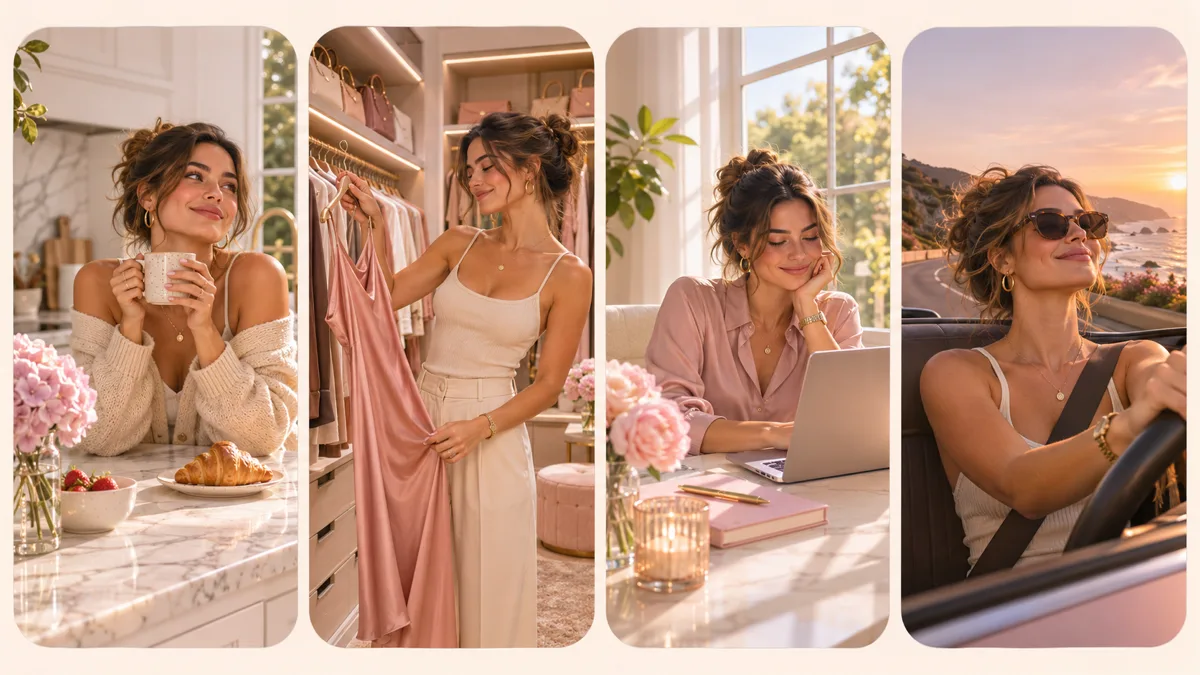
- The "housewife era" POV montage. Four to six quick shots of a dream life — a bright kitchen, a walk-in closet, a quiet morning coffee, a laptop showing your own brand, a slow drive at golden hour — each with a short text overlay. The caption is usually "POV: my housewife era" or a version of "I'm my own housewife".
- The dance clip. A short dance to the sound, often filmed in a styled room. This is the format people try first and abandon fastest, because the room matters as much as the moves.
The montage is the one that works best with AI, because every shot is a still scene with gentle motion — exactly what image-to-video models do well.
The problem with filming it for real
The trend asks you to show a life you do not have yet. People solve that in three bad ways: borrowing a friend's apartment, filming stock-looking corners of their own place, or reposting other people's footage. The first is a hassle, the second looks flat, the third is someone else's content.
The difference with an AI version is that you stay in the shot and the setting is invented. You upload your own photo, place yourself in an original scene, and animate it. Nobody's home, likeness or footage gets copied — including the artist's.
How to make a housewife era video with AI (step by step)
Plan five shots of about four seconds each. That fills the length most creators use and keeps every clip short enough to stay consistent.
1. Write your five-shot list
Decide what your housewife era means before you open any tool. A simple list works:
| Shot | Scene | Text overlay idea |
|---|---|---|
| 1 | Morning light, coffee at a marble kitchen island | "my housewife era" |
| 2 | Walk-in closet, choosing an outfit | "no one picks for me" |
| 3 | Laptop on a desk, a dashboard you own | "my business, my rules" |
| 4 | Golden-hour drive along a coast road | "paid for it myself" |
| 5 | Evening on a terrace, city lights | "this is the era" |
Keep the people and the outfit consistent across shots. That is what makes it read as your life rather than five random clips.
2. Put yourself in each scene with image to image
Open image to image and upload one clear, front-facing photo of yourself. Then describe one scene per generation. A prompt structure that keeps your face stable:
Keep the same person, face, skin tone and hairstyle from the photo. Place her in a bright modern kitchen with a white marble island, morning sunlight through tall windows, holding a ceramic coffee cup, wearing a cream knit set. Soft, editorial lighting, 9:16 vertical. No text, no logos, no other people.
Swap the scene sentence for each shot and keep everything else identical. If an outfit drifts between shots, the clothes changer AI can put the same outfit back on a result you otherwise like.
3. Animate each still with image to video
Take each still into image to video. Vogoo lists 24 models there, with clips up to 20 seconds, but for this trend you want short and calm: four or five seconds per shot, with motion prompts like:
- "Slow push-in, she lifts the cup and smiles, steam rising, light shifting through the window."
- "Camera glides past the rails of the closet, she turns toward the lens."
- "Handheld car interior, warm sunset flare, hair moving in the wind."
Small, believable motion keeps the face intact. Big actions — spinning, running, crowds — are where faces start to change.
If you would rather skip the photo step for scene-only shots (the empty terrace, the coastline), text to video can generate them straight from a prompt.
4. Optional: the dance version
For the dance format, record yourself doing the moves once in any room, then use motion control: it transfers the motion from a reference video onto a character image — here, your own still in the dream setting. Use your own dance recording as the reference, not clips from the official music video or other creators.
5. Add sound and captions
Vogoo does not provide the song, and you should not upload a ripped copy of it. You have two clean options:
- Join the trend sound inside TikTok. Export your clips silent, then attach the "Housewife" sound from TikTok's own sound library when you post. That is how the trend links videos together, and it keeps the audio inside the platform's licensing.
- Use an original track. For Reels, Shorts or anywhere else, generate a royalty-free backing track in text to music — something like "confident upbeat pop, glossy synths, 100 BPM, no vocals".
Finish with the text overlays from your shot list in TikTok's editor.
6. Label it as AI
TikTok asks creators to label content that is fully generated or significantly edited with AI, and realistic AI video falls in that group. Turn on the AI-generated content setting before you post (TikTok's help page shows where). The label does not limit distribution, and it is the honest call for a video built from generated scenes.
What makes the AI version better than most
Most housewife-trend clips are either a real home or a borrowed aesthetic. An AI version can do two things neither of those can:
- Show the specific life you mean. Your own brand on the laptop screen, your dream city outside the window, the car you are actually saving for. Specific beats generic in this trend.
- Stay you, not a lookalike. Every shot starts from your own photo. Avoid prompts that ask to look like the artist or recreate her video sets — it is a copyright and likeness problem, and it misses the point of a trend about defining the life on your own terms.
Quick checklist before you post
- One source photo, used for every shot.
- Five scenes, one clear idea each.
- Four to five seconds per clip, gentle motion.
- No celebrity faces, no music-video recreations, no logos.
- Trend sound added inside TikTok, or an original track elsewhere.
- AI-generated label switched on.
Ready to build yours? Start with image to image for your first scene, then animate it in image to video.
FAQ
What does "housewife era" mean on TikTok?
In this trend, "my housewife era" means the life you define and pay for yourself — luxury, independence, romance, or simply calm — set to the song. It plays on the old meaning of "housewife" rather than endorsing it.
Is the housewife trend a tradwife trend?
Not by intent. The song's framing points toward independence, though some creators and viewers read it as a tradwife anthem. That split is part of the conversation around the trend.
Can I use the original song in an AI video?
Add it from TikTok's sound library when you post on TikTok. Do not download and re-upload the recording or use it on other platforms without a license; use an original track instead.
Can AI make me look like the artist in the video?
You should not try. Using a real person's likeness without permission is a legal and platform-policy risk. The trend works better with your own face anyway.
How long should each AI clip be?
Four to five seconds per shot, five shots in total. Short clips stay consistent and match the pacing of the trend.
Sources
- InMusic — Tate McRae's "Housewife" on TikTok: release date, the 309,000+ creations figure and the "housewife era" manifestation framing.
- Capital FM — Tate McRae explains the meaning behind "Housewife": the artist's own description of the song (October 16, 2026).
- Tokchart — Housewife sound stats: video count and top regions for one tracked sound, snapshot of November 4, 2026.
- TikTok Support — AI-generated content: when and how to label AI content.
Trend figures come from third-party trackers and change daily. Tool capabilities are from Vogoo's own product pages on 2026-11-05. Vogoo is not affiliated with Tate McRae, her label or TikTok.
Author

Categories
More Posts
How to Make a Twitter Header: 5 Steps That Work Every Time
How to make a Twitter header in 5 steps: set the 1500×500 size, generate or design, protect the safe area, export sharp, and upload without blur.
Prompts for Gemini AI Halloween Photos: 12 Looks
Copy-paste prompts for Gemini AI Halloween photos: costume try-ons, pet costumes, couple looks and short video clips, with the keep/change/avoid structure that keeps your face intact.
Audio to Video AI: Seedance 2.5's Audio-Only Mode
Seedance 2.5 adds audio-only reference: drive pacing, beat cuts, and lip sync from one music or voice clip. Audio to video AI guide with official demos.
Newsletter
Join the community
Subscribe to our newsletter for the latest news and updates