
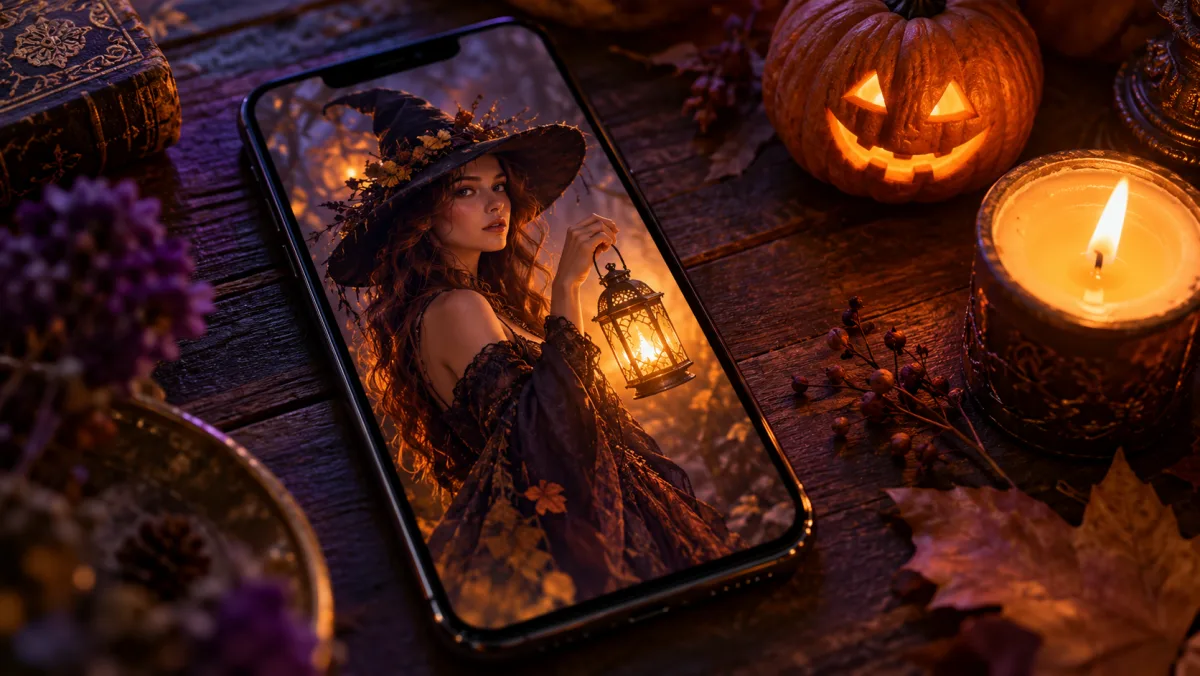
Prompts for Gemini AI Halloween Photos: 12 Looks
Copy-paste prompts for Gemini AI Halloween photos: costume try-ons, pet costumes, couple looks and short video clips, with the keep/change/avoid structure that keeps your face intact.
You upload a selfie to Gemini, type "make me a Halloween costume", and get back a stranger in a witch hat. The face is wrong, the costume is generic, and the background is a cartoon. That is the usual first attempt at the AI Halloween photo trend, and it is why most people give up after one try.
The fix is not a better model. It is a better prompt. The prompts for Gemini AI Halloween photos below follow one structure — what to keep, what to change, where the scene is, what the light does, what must not appear — and that structure is what keeps your real face while the costume, makeup and setting change around it. Every prompt here was written for photo editing (you upload a picture first), tested on 2026-10-20 in Vogoo's own Halloween generator, which runs on Google's Nano Banana image model, and kept free of licensed characters so the result is safe to post.
Why most Halloween prompts fail in Gemini
Gemini's image editing takes an uploaded photo plus a text instruction and returns an edited image. When the instruction is one line — "turn me into a vampire" — the model has to guess everything else: whether to keep your face, how much of the outfit to replace, what the background should be, how dark the mood is. It guesses differently every time, so results swing from "that's not me" to "that's a cartoon".
A prompt that works tells the model five things, in this order:
- Keep — the subject's face, skin tone, proportions and the number of people.
- Change — the costume, makeup, hair and accessories, described as an original look rather than a named character.
- Scene — one specific place (a foggy porch, a candlelit hall, a moonlit garden).
- Light — the mood words the model actually responds to: cinematic, candlelit, moonlit, warm orange, teal.
- Avoid — gore, text, logos, extra people, a changed face.
Each prompt below is built that way. Paste it as-is, or swap the costume and scene lines for your own.
How to use these prompts in Gemini
- Open Gemini (app or web) and start a new chat.
- Attach a clear, front-facing photo — one person for the selfie prompts, both people in one shot for the couple prompt, the pet alone for the pet prompts.
- Paste one prompt. Do not add "make it scary" or "add text" on top; extra instructions are where faces start drifting.
- If the face changes, reply with "Keep my face exactly as in the uploaded photo, only change the costume and background" and regenerate.
- Download the result. For a square or vertical crop, say so in the prompt ("3:4 vertical portrait") rather than cropping afterwards.
The same prompts work in any editor that accepts a reference photo. If you want the costume looks as one-click presets instead of pasting text, the AI Halloween photo generator on Vogoo has twelve of them built in, keeps up to six faces in one shot, and your first photo is free.
Selfie prompts: costume try-on
Forest witch
Edit the uploaded photo into a forest witch Halloween portrait: wide-brim black hat, layered dark-green cloak, a glowing lantern in hand, misty enchanted autumn forest with fireflies, soft cinematic light. Keep my face, skin tone and expression exactly the same. No text, no logos.
Skeleton makeup
Edit the uploaded photo into a skeleton makeup Halloween portrait: detailed black-and-white skull face paint that follows my real bone structure, dark hoodie, candlelit studio with orange and purple rim light, photorealistic skin texture. Keep my facial proportions exactly the same. No gore, no text.
Elegant vampire
Edit the uploaded photo into an elegant vampire Halloween portrait: black velvet cape with crimson lining, subtly pale skin and dark lips, candlelit gothic hall with tall windows, moody cinematic lighting. Keep my face recognizable. No blood, no text.
Midnight braids
Edit the uploaded photo into an original gothic Halloween fashion portrait: long violet braids with delicate silver hair charms, a black-and-purple velvet outfit with subtle lace, a moonlit Victorian garden with soft fog and glowing lanterns, photorealistic editorial lighting. Keep my face and skin tone exactly the same. No extra people, no text.
Cosmic princess
Edit the uploaded photo into an original celestial princess Halloween portrait: midnight-blue fantasy gown with silver embroidery and softly glowing star patterns, a delicate silver moon crown, a moonlit observatory with a starry sky through tall windows, cinematic rim lighting. Keep my face recognizable. No text, no watermarks.
Haunted mascot
Edit the uploaded photo into a haunted mascot Halloween portrait: an original plush pastel-pink unicorn mascot costume with a cracked glittery horn, stitched smile and slightly unsettling button eyes, my own face visible through the open mascot head, dim carnival lights behind, photorealistic. Keep my face exactly the same. No gore, no text, no logos.
Why the mascot prompt says "original": this season's trending costumes come from new horror films and games, and the fastest way to get a refusal — or a takedown later — is to name the character. Describe the silhouette (plush mascot, cracked horn, stitched smile) and you get the look without the license.
Pet prompts
Pumpkin pet
Edit the uploaded pet photo into a pumpkin pet Halloween portrait: a soft orange pumpkin costume with a small green leaf hood fitted naturally around the body without covering the eyes, a cozy autumn studio with miniature pumpkins and warm light, photorealistic fur. Keep the pet exactly recognizable, same breed and markings. No text.
Glow dinosaur
Edit the uploaded pet photo into a glow-in-the-dark dinosaur pet Halloween portrait: a plush green dinosaur costume with softly glowing spine fins, a dark living room lit by purple and teal glow, playful mood. Keep the pet fully recognizable. Do not change the species or fur color. No text.
Pets fail for a different reason than people: the model loves to "improve" the breed. The two lines that matter are "same breed and markings" and "do not change the species". Leave them in.
Couple prompt
Cowboy and angel
Edit the uploaded couple photo into a cowboy and angel duo Halloween portrait: one person in a brown western hat, fringe jacket and bandana, the other in a white feathered angel outfit with a soft halo glow, a warm autumn porch with string lights and pumpkins, photorealistic. Keep both faces exactly the same and the same number of people. No text.
"Same number of people" is not decoration. Without it, duo prompts regularly add a third figure or merge two faces into one.
Video prompts: animate the photo
Once you have a still you like, the natural next step is a five-second clip for a story or reel. These two prompts are written for an image-to-video model that takes your generated photo as the first frame — Gemini's video model, or the image to video tool on Vogoo.
Slow turn in the fog
Use the provided image as the exact starting frame. Create a continuous five-second cinematic Halloween portrait animation. The subject slowly turns their head toward the camera with a subtle mysterious expression, a gentle breeze moves loose hair strands, soft fog drifts through the scene, the camera performs a slow smooth push-in. Keep the face, costume and lighting consistent with the reference. No scene cuts, no text.
Lantern flicker
Use the provided image as the exact starting frame. Five-second clip: the lantern light flickers and casts moving shadows, the subject blinks once and smiles slightly, leaves drift down in the background, camera holds still. Keep the person's identity and costume unchanged. No text, no watermarks.
Keep first versions to small motions — a blink, a turn, drifting fog. Big dance moves are where identity breaks.
Three rules that keep the face
- Front-facing, well lit, no sunglasses. The model preserves what it can see. A side profile in shadow gives it nothing to keep.
- One instruction per generation. Costume first; if you want a different background, run it again on the result instead of stacking changes.
- Say what not to do. "No gore, no text, no extra people" removes the three most common surprises. For kids' photos, add "playful, not scary".
FAQ
Are these prompts free to use in Gemini? The prompts are free to copy. Whether Gemini generates images for free depends on your account and current limits, which Google changes; check the Gemini app for what your plan allows.
Can I use the results commercially? The looks above are original costume descriptions, not licensed characters, so the usual blocker is gone. Commercial rights to AI output still depend on the tool's terms, so check them before selling prints.
Why does Gemini change my face even with "keep my face"? Usually the photo, not the prompt: low light, a tilted head or a group where faces are small. Re-upload a clearer photo and keep the prompt.
Can I do the AI Halloween photo trend without writing prompts? Yes. A preset-based tool does the prompt for you: pick a look, upload, generate. Vogoo's AI Halloween photo generator ships these twelve looks as cards, and the first photo is free.
Do these prompts work for group photos? Yes, with "keep every face and the same number of people" added. Up to six faces is realistic; beyond that, faces get small enough that identity slips.
Sources
- Google — Image editing in Gemini: the official announcement of Gemini's photo-editing model (the one behind the "upload a photo, describe the change" workflow these prompts target).
- Google Gemini — Image generation overview: Google's own page on generating and editing images in the Gemini app, including working from an attached photo.
- Google Trends — ai halloween: the late-October search spike this guide is timed for.
Prompt wording and the keep/change/scene/light/avoid structure are Vogoo's own, tested on Vogoo's Nano Banana-based Halloween generator on 2026-10-20. Gemini's limits and features change frequently; the sources above are the place to check current behavior.
More Posts
Seedance 2.5 Prompt Guide: The @ Reference Syntax
This Seedance 2.5 prompt guide covers the official @ reference syntax: 7 modality combos, 50-reference specs, ratio rules, and real ByteDance prompts.

GPT Image 2.5 vs 2: Every Real Difference
GPT Image 2.5 vs 2 on the things that change your code: two new quality tiers, 50% lower latency, identical token rates, and a cost calculator that now lies.
Is the Gemini AI Picture Generator Free? Limits and Alternatives
Is Gemini's AI picture generator free? Yes, with limits. Here's the real story on daily quotas, watermarks, sign-in, and what to try when you hit the wall.
Newsletter
Join the community
Subscribe to our newsletter for the latest news and updates