 Vogoo.ai
Built for the Qwen Image 3.0 model
Qwen Image 3.0 is Alibaba's third-generation Qwen AI image model, built to read ultra-long prompts of up to 4.5K tokens and render complete infographics, ~10px text and native type in 12 languages in a single pass. Generate with the Qwen Image model free in the Vogoo workspace.
Features Flow
Qwen Image 3.0 goes beyond generation — Alibaba built the Qwen Image family to read ultra-long prompts and reason about layout, so qwen3 image output behaves like a working reference, not a flat picture.
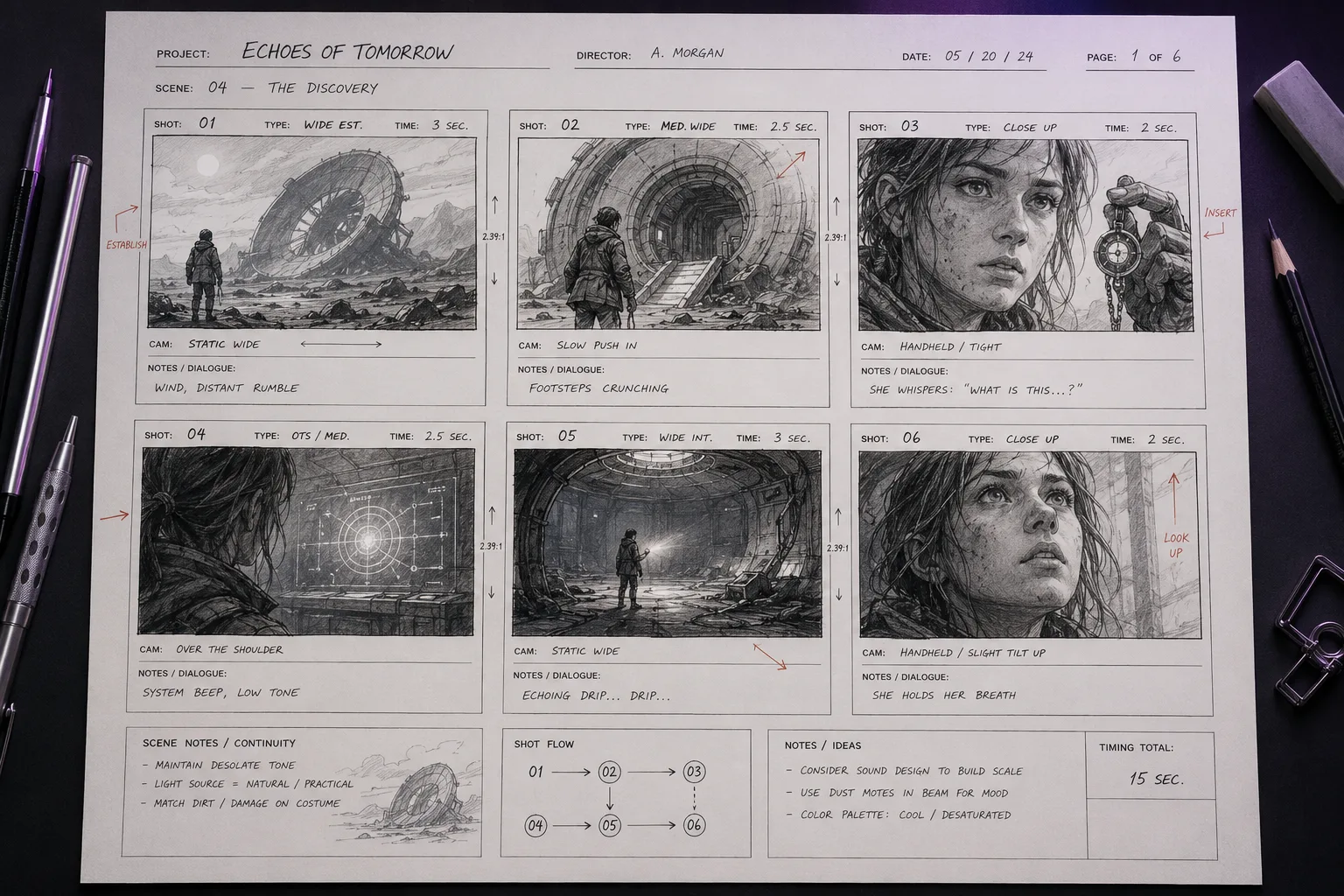
Qwen Image 3.0 accepts prompts of up to 4.5K tokens — about 4.5× the input length of the previous Qwen Image generation. Film storyboards, knowledge diagrams and dense product-explanation pages no longer need to be compressed: you hand the Qwen AI model the full brief and it plans the whole layout from it.
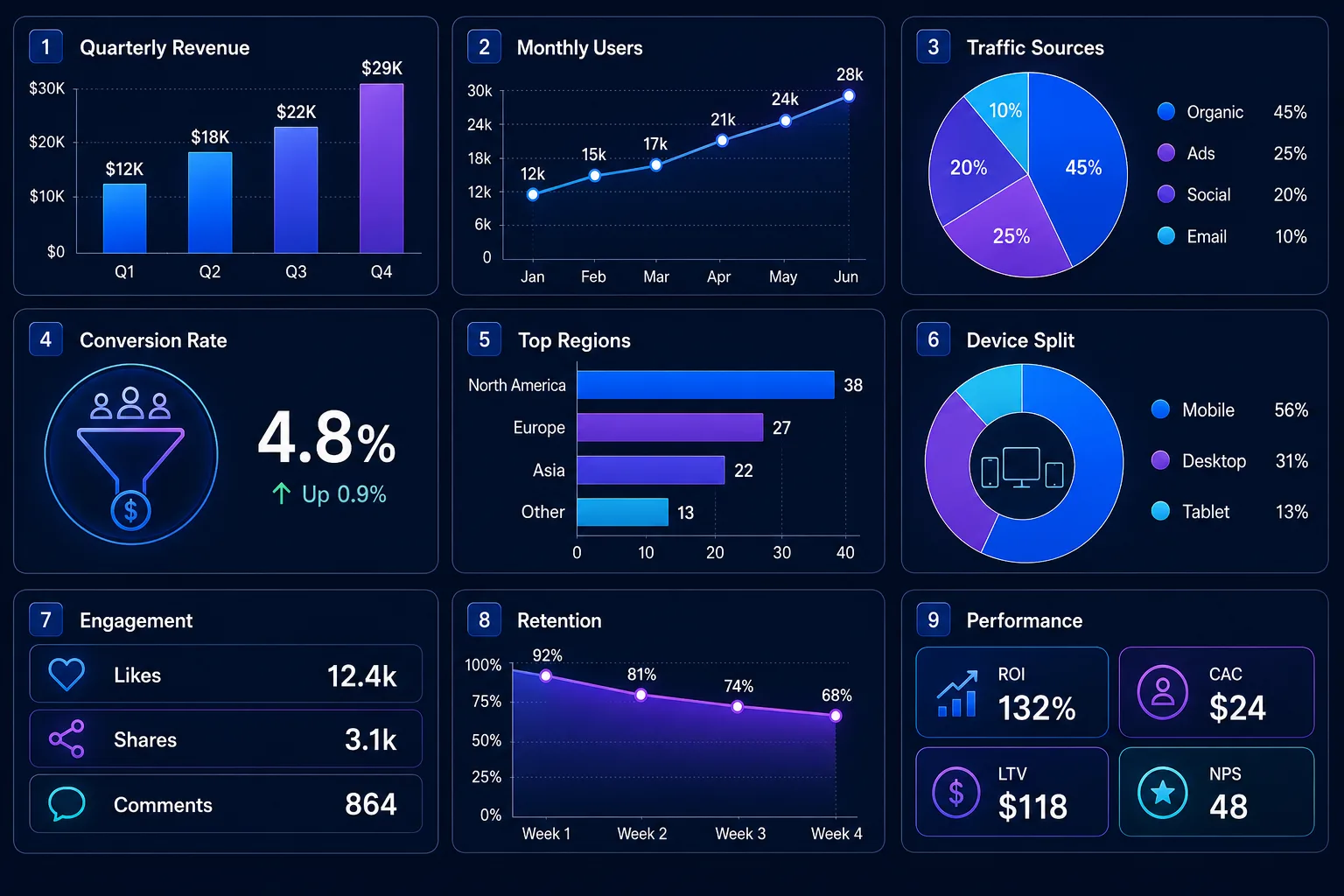
The Qwen Image model renders complete infographic grids, tables and text as small as roughly 10 pixels in a single forward pass — the small-type case that trips up prompt-only image models. Labels, headings and captions land legibly instead of dissolving into garbled shapes.
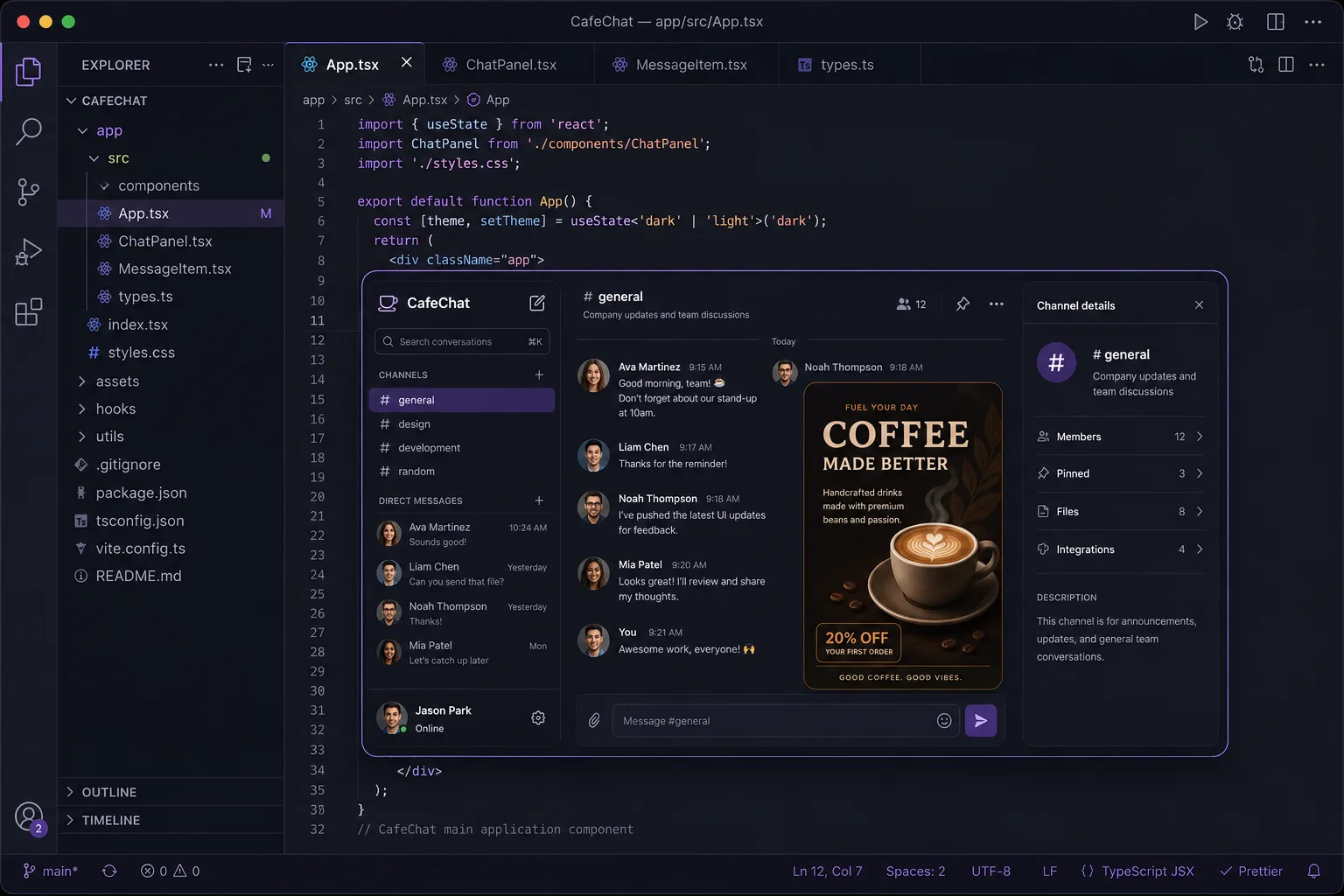
Ask for a multi-layered UI mockup, a math formula, a geometric figure or a logical derivation and Qwen Image 3.0 keeps the structure coherent and the style consistent across every interface in the frame. It is the reasoning that makes qwen3 image output usable as a working reference, not just a picture.
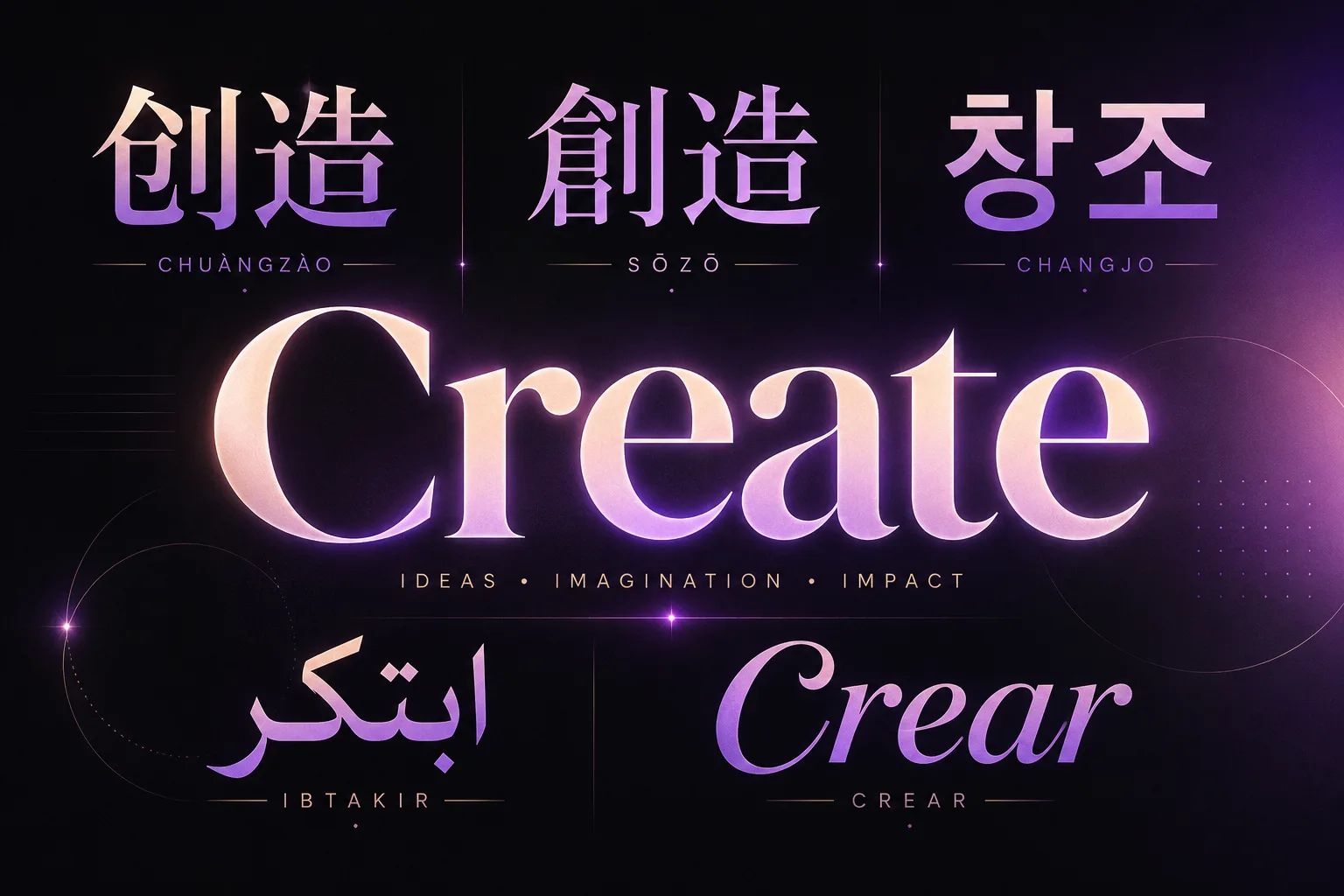
Headlines, labels and captions render with correct glyphs across 12 languages, with a choice of more than 20 fonts, so a single Qwen Image AI Image Generator layout ships across regions. Text is treated as part of the composition, which is why poster and packaging copy comes out clean.
Compare
Where Qwen Image 3.0 fits: it leads on long-prompt reasoning — 4.5K-token input, single-pass infographics and multi-layer UI — while Qwen Image 2.0 is the lighter, faster tier and Seedream 5.0 Pro focuses on editable layers and region edits.
| Long-prompt reasoning Qwen Image 3.0 | Lighter & faster Qwen Image 2.0 | Editable design Seedream 5.0 Pro | |
|---|---|---|---|
| Best for | Long prompts, infographics & UI | Fast everyday typography | Layer separation & region edits |
| Max prompt length | Up to 4.5K tokens | Standard | Standard |
| Single-pass infographics & ~10px text | Yes | Limited | Yes |
| Multi-layer UI in one pass | Yes | — | — |
| Native text languages | 12 languages · 20+ fonts | Improved typography | 14 languages |
| Live in Vogoo | Yes | Yes | Yes |
Who it's for
The Qwen Image model fits anyone who needs long-prompt reasoning — infographics, multi-layer UI, formulas and accurate multilingual text — from data designers to educators.
Turn dense reports and stat sets into clean, high-density visuals with Qwen Image 3.0, without hand-placing every chart, label and caption. Because the Qwen AI model plans hierarchy first, numbers, headings and callouts land where a designer would put them.
Feed the full 4.5K-token brief for a film storyboard or a knowledge diagram in one prompt. Qwen Image 3.0 reads the long context end to end instead of forcing you to trim the scene list down to fit.
Generate multi-layered UI mockups and product-explanation pages where nested interfaces keep a consistent style. The qwen3 image reasoning holds the layout together across every panel in the frame.
Localize one campaign visual across 12 languages while glyphs and font choice stay correct, so a single layout ships to every region. Regenerate the text layer instead of rebuilding each locale by hand.
Produce display type and packaging copy that stays legible down to small point sizes. With 20+ fonts available, the Qwen Image model renders lettering as part of the layout rather than a pasted-on afterthought.
Render formulas, geometric figures and logical derivations as clean visuals for slides and docs. Qwen Image 3.0 keeps the notation readable, which the earlier qwen image 2.0 generation handled less reliably.
How it works
The generator keeps the flow simple: write a long or short prompt, set size and output, then generate and download — all in one Vogoo workspace.
Describe your image or paste a full brief — Qwen Image 3.0 reads up to 4.5K tokens, so you can hand it the whole storyboard or layout plan at once.
Pick the aspect ratio and resolution in the Vogoo workspace. The Qwen Image model shows the exact credit cost before you run the job.
Create the image and download it, or refine the prompt and regenerate — the full flow stays in one Vogoo workspace, no API setup required.
User reviews
Designers, marketers and writers use the Qwen AI model for long prompts, single-pass infographics, multi-layer UI and accurate multilingual text.
“Qwen Image 3.0 lays out a dense data graphic with the labels already in place, and the small text stays readable. It saves me the tedious part of infographic work.”
Infographic Designer
“We localize one Qwen Image layout across Arabic, Japanese and English and the type stays correct. One design, every market.”
Marketing Lead
“A multi-layer UI mockup used to take several rerolls. The qwen3 image reasoning keeps the nested panels consistent in one pass.”
Product Designer
“With 20+ fonts, display lettering comes out as part of the layout, not pasted on. Qwen Image 3.0 is the first Qwen model where my art-text actually reads.”
Poster Artist
“I paste a full 4.5K-token brief for a knowledge diagram and Qwen Image 3.0 reads all of it. No more trimming the scene list to fit.”
Technical Writer
“Running the Qwen Image model right in Vogoo with no API setup means I go from prompt to product visual in one place.”
E-commerce Seller
FAQ
Answers cover what Qwen Image 3.0 is, its text and bilingual rendering, using it free in the browser with no GPU, how it differs from Qwen Image 2.0, prompt length, languages, and whether it is open source.
Qwen Image 3.0 is Alibaba's third-generation Qwen AI image model, released on July 21, 2026 by the Qwen team. It focuses on practical, working images: it accepts ultra-long prompts of up to 4.5K tokens and renders complete infographics, multi-layer UI, formulas and text as small as ~10 pixels in a single pass. This page is a live generator inside Vogoo.
Turn a long or short prompt into infographics, multi-layer UI and multilingual posters with the Qwen Image model — 4.5K-token input, single-pass rendering and native text in 12 languages, all in one Vogoo workspace.
Try Qwen Image 3.0